ReachLink sends you reminders before your sessions and lets you know when your provider messages you. Session reminders are sent automatically.
They don't include a link to join — you join inside the ReachLink app or at reachlink.com. See Joining Your Session Troubleshooting Guide.
How to Get There
- Go to Account Settings.
- Select Communication Preferences from the menu.
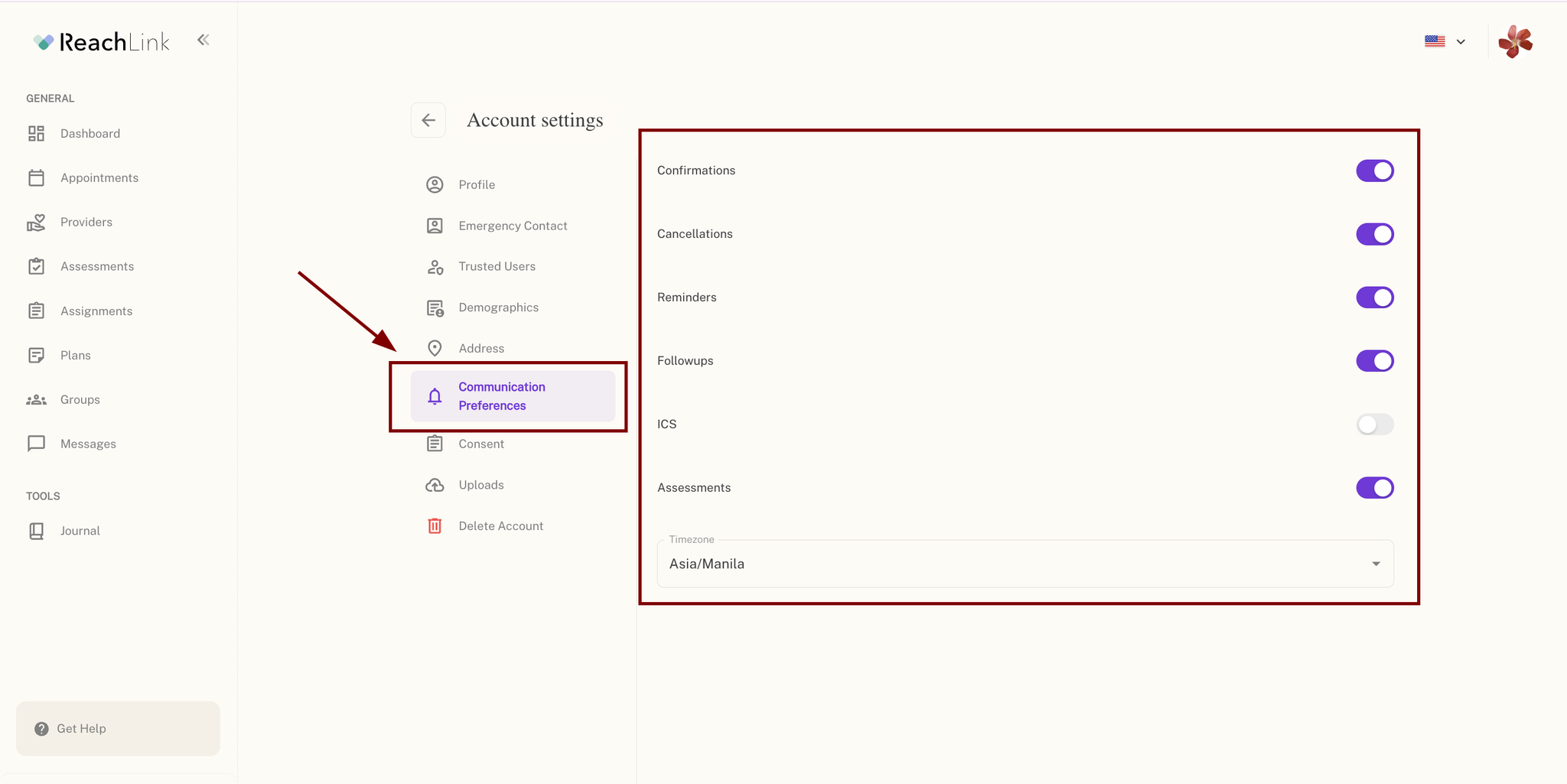
What You Can Control
- Confirmations
- Cancellations
- Reminders
- Followups
- ICS
- Assessments
Toggle any of these on or off based on what you'd like to be notified about.
You can also set your Timezone here, which determines how your notification timing is displayed (e.g., Asia/Manila).
If it doesn't work
- Not getting reminders? Check that your phone number and email are up to date in your account. Check your spam or junk folder for reminder emails.
- Missed a message from your provider? Open the ReachLink app and look for the badge on Messages.
Still need help?
We're here for you.
- Phone: 833-588-7992 (call only — this number doesn't accept texts)
- Email: support@reachlink.com
- In the app: tap Get Help