
What You Can Do Here
Lets you upload, search, download, and manage documents you’ve shared in your account.
Payment Methods
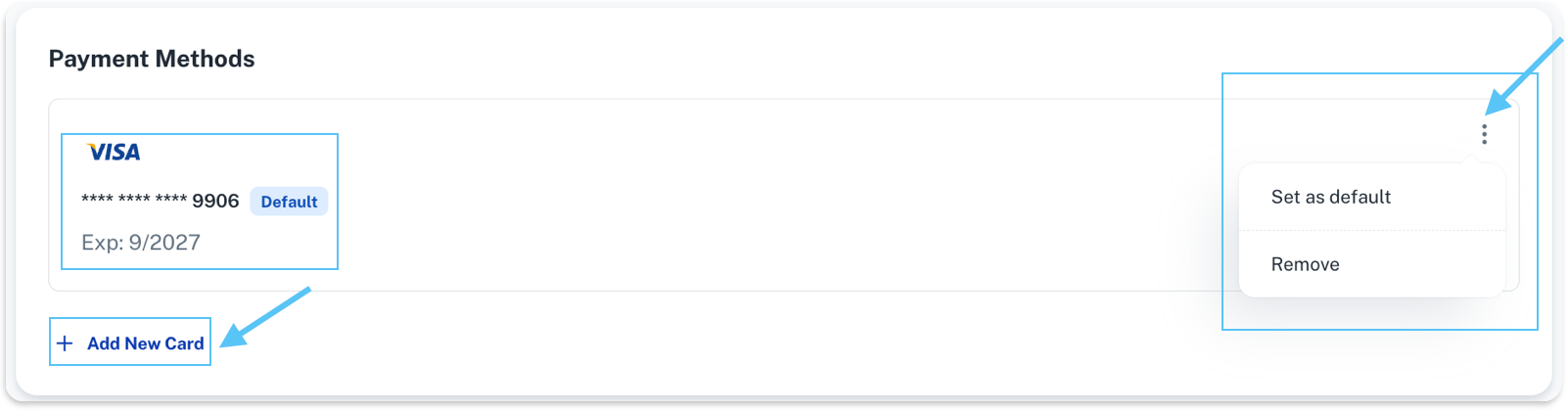
You can see the following details:
- Your saved cards (for example, Visa, Mastercard)
- Masked card number (only the last 4 digits are shown)
- Card expiration date
- Which card is marked as Default
What you can do:
- Add a new card by clicking Add New Card
- Open the options menu (three dots) next to a card to manage it
- Set a card as your default payment method (if available)
For security reasons, full card numbers are never displayed.
Billing History
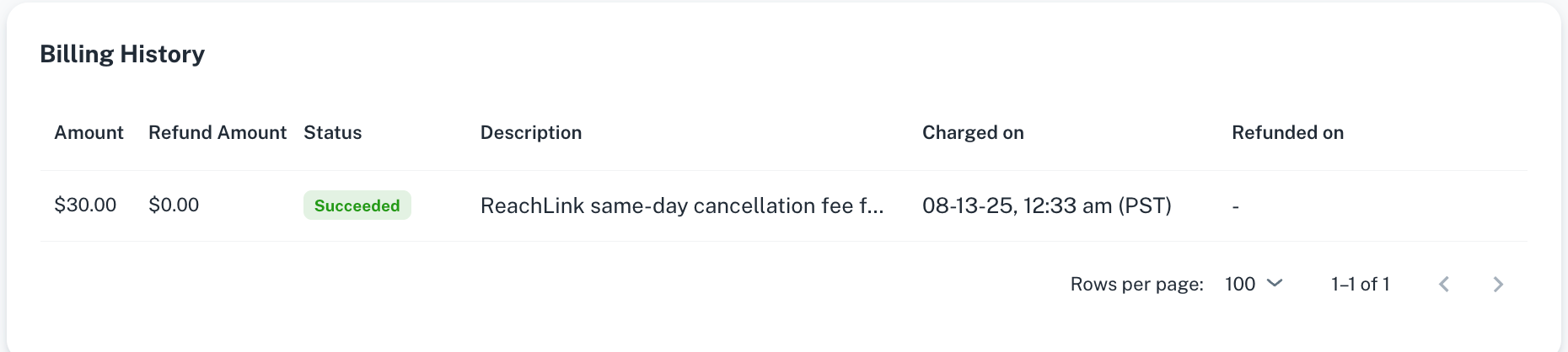
Details you may see:
- Amount – Total charged for the transaction
- Refund Amount – Any refunded portion (if applicable)
- Status – Current transaction status (for example, Succeeded)
- Description – What the charge was for
- Charged on – Date and time the charge was processed
- Refunded on – Date of refund, if applicable
You can use this history to track payments, confirm charges, or reference past transactions.
If You Have Billing Questions
- Don’t recognize a charge? Review the description and date in Billing History.
- Payment failed? Check your default card or add a new payment method.
- ReachLink Care Coordinators are also here to help:
- In the app: Tap Get Help in the sidebar
- Email: support@reachlink.com