logo
📒
ReachLink Member Knowledge Base
➡️
Get Started
📱
Mobile App Setup Guide
🖥️
ReachLink Member App
📱
Mobile App
General
Tools
📝
Assignments
✍️
Journals
💬
Carebot
📲
Carebot—Text Mode
🗣️
Carebot— Dictate Mode
📞
Carebot— Call Mode
Settings
🚧
Launching Soon
🌐
Web App
💙
Care Coordination
🕐
Hours of Operation
🎯
Enrollment
🩺
Managing Your Care
🔧
Troubleshooting Audio, Video, and Connection Issues
🚨
What to Do If You Are in an Emergency or Crisis
📚
Legal
Intake/Informed Consent
Privacy Policy
Terms of Use
Notice of Privacy Practices (HIPAA)
Section 1557 Nondiscrimination Notice
ReachLink Accessibility Statement
North Carolina Compliance Statement
Arizona Compliance Statement
Washington Compliance Statement
Oregon Compliance Statement
Colorado Compliance Statement
🪢
System
🗒️
Release Notes
ReachLink Member Knowledge Base
/
ReachLink Member App
/
Mobile App
/
Tools
/
Carebot

Carebot— Dictate Mode

Dictate Mode lets you talk to Carebot using your voice instead of typing.
It's helpful when you want to speak freely or when typing feels difficult.

💡 How to use

  1. To use Dictate Mode, tap the microphone below and start speaking.
  • When you're silent, you'll see a quiet mic icon.
  • When you speak, the mic displays moving sound waves to show it's listening.
Carebot converts your words into text and responds with the same gentle tone—just like in a normal chat.
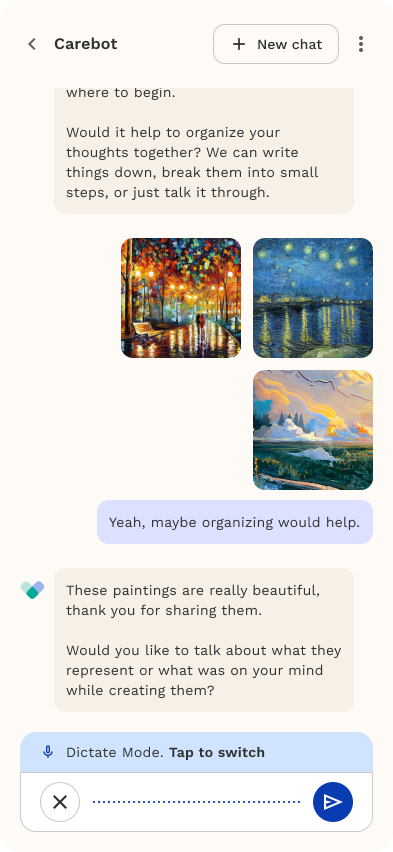
Image without caption
Carebot—Text Mode
Carebot— Call Mode

Powered by Notaku
Helpful?
Share
Content
Carebot— Dictate Mode
💡 How to use